From IIS to Azure Container Apps: my website, containerised and a lot cheaper
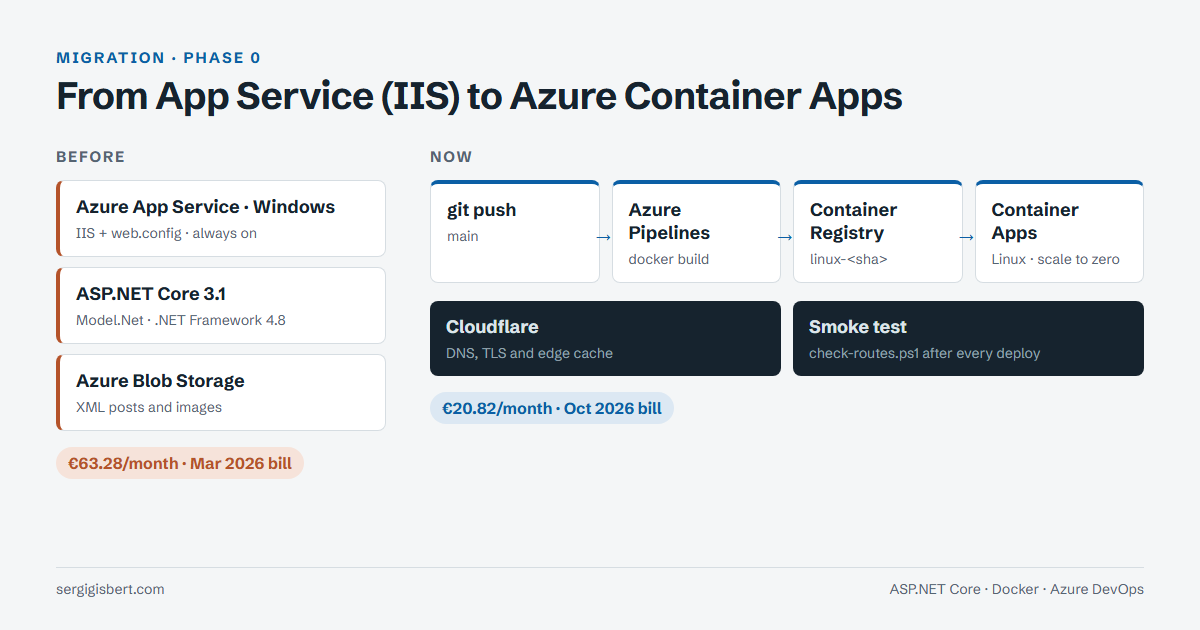
Back in December 2020 I wrote (in Spanish) about moving this website to ASP.NET Core, and I finished by saying the next step would be .NET 5 and Azure Tables... Well, neither happened :) What did happen, five years later, is an update that is much kinder to my wallet.
This is the first of three posts about bringing the site up to date:
- From IIS to Azure Container Apps (this post): infrastructure and cost savings.
- Visual redesign: goodbye Bootstrap 3 and the 2013 template.
- Performance optimisations: less JavaScript and a much faster cold start.
The problem: paying to keep the lights on
The site lived on an Azure App Service on Windows: IIS with its web.config, always on, on a plan sized "just in case". For a low-traffic personal site, that meant €63.28 a month before VAT (€76.57 with it, March 2026 bill) for a machine waiting for someone to show up. Not much sense in that.
The long-term plan is something else (more on that some day), but I wanted a quick win: cut the bill without rewriting the app. Azure Container Apps fits that nicely: you package the app as a Docker image and Azure scales it with traffic, down to zero replicas when nobody is around. You only pay while the container is actually working.
Putting the site in a container
The app is still ASP.NET Core 3.1 (yes, I know it is out of support, one thing at a time), with two libraries next to it, Model.Net and Shared. That is why the Dockerfile builds from the repository root instead of src/. It is a textbook multi-stage build: copy the .csproj files first so the restore layer is cached, publish in Release, and keep only the runtime:
# ── Stage 1: Build ──
FROM mcr.microsoft.com/dotnet/core/sdk:3.1 AS build
WORKDIR /repo
COPY Miniblog.Core.sln ./
COPY src/Miniblog.Core.csproj ./src/
COPY Model.Net/Model.csproj ./Model.Net/
COPY Shared/Shared.csproj ./Shared/
RUN dotnet restore src/Miniblog.Core.csproj

COPY src/ ./src/
COPY Model.Net/ ./Model.Net/
COPY Shared/ ./Shared/
RUN dotnet publish src/Miniblog.Core.csproj -c Release -o /app/publish

# ── Stage 2: Runtime ──
FROM mcr.microsoft.com/dotnet/core/aspnet:3.1 AS runtime
WORKDIR /app
COPY --from=build /app/publish .
EXPOSE 80
ENTRYPOINT ["dotnet", "Miniblog.Core.dll"]
Bumps in the road: from Windows to Linux
"Without touching the code" did not last long. First surprise: Model.Net was still a .NET Framework 4.8 library inherited from the 2013 version, which means Windows images. So I migrated it to netstandard2.0 and, while at it, replaced the AppDomain-based path lookup, which makes no sense in .NET Core:
// Before (.NET Framework)
var rootPath = (string)AppDomain.CurrentDomain.GetData(AppDomainConstants.ContentRootPath);

// Now (netstandard2.0)
_contentRootPath = hostingEnvironment?.ContentRootPath ?? AppContext.BaseDirectory;
And then the classics for anyone who has always lived on Windows:
- Path separators:
"xml-data\\Projects.xml"works on Windows, but on Linux there is no such file. Switched to/, which works on both. - Case sensitivity: on Linux,
Photo.PNGandphoto.pngare two different files. Some project images vanished until I matched the names in the XML to the real files. - Unknown slugs: a project URL that did not exist threw an unhandled exception. It now redirects to the home page.
CI/CD with Azure DevOps
Now every push to main runs an Azure DevOps pipeline with three stages: build the image and push it to Azure Container Registry, update the Container App with the new tag, and verify. The deployment itself is basically a single Azure CLI command:
az containerapp update \
  --name $(containerAppName) \
  --resource-group $(resourceGroup) \
  --image $(acrRegistry)/$(dockerImageName):linux-$(Build.SourceVersion)
The verify stage runs a small script, check-routes.ps1, which checks that the main routes (/es, /en, /blog, projects, biography...) return a 200 with no redirects. If anything breaks, the pipeline goes red before I find out some other way. In front of everything sits Cloudflare, which already handled DNS and TLS, and which plays a much bigger part in the third post.
With a little help from AI
I won't pretend otherwise: a good part of this work was done side by side with Claude Code, Anthropic's coding assistant. The migration was planned with it as a document of verifiable tasks (Dockerfile, pipeline, environment variables, domain...), executed and ticked off one by one, and every Linux issue that showed up in the container was debugged on the spot.
Later on, with the site already in the container, I went a step further: capturing repetitive processes inside the repository itself, which is what I value most:
- A
/smoke-testskill that starts the container locally withrun-docker.ps1and runs the samecheck-routes.ps1as the pipeline. - A hook that runs
dotnet buildevery time a.csfile is edited and reports errors straight away. - Another hook that blocks accidental edits in
bin/,obj/or duplicate working copies. - A read-only subagent,
upgrade-auditor, that reviews what blocks each of the upcoming migration phases.
The AI proposes and executes, but the decisions are still mine. As always, treat it like a very fast junior colleague: you review everything.
The result
The site works exactly as before, but it now runs in a Linux container that can shut down when nobody is visiting. And the bill shows it: October 2026, with the container already running, came to €20.82 (€25.19 including VAT), compared with €63.28 (€76.57 including VAT) in March. That is roughly €510 less per year before VAT, over €600 with it. The breakdown: €16.02 for the Container App itself (0.25 vCPU and 0.5 GB), €4.54 for the Container Registry and €0.26 for storage. The old App Services are still there, but on the free F1 plan.
Still, that is more than I estimated when planning (between €5 and €13), and the metrics explained why: in October the replica was up for 743 of the month's 744 hours. With around 99,000 requests (one every ~27 seconds, between visitors, search engines and bots) and a 5-minute cooldown, the container never gets the chance to shut down. Scale to zero works, but only when things go quiet. That is where the Cloudflare cache from the third post comes in: the fewer requests reach the origin, the more hours at zero.
The price to pay? The cold start: when the replica is at zero, the first visitor waits for the container to boot. How I made that wait a lot shorter is in the third post, but first, something more visible: the redesign.